
Nokia BGW320-505

Here’s a detailed breakdown of the Nokia BGW320-505 — one of Nokia’s high-end fiber gateway/ONT devices. This will cover what it is, its features, pros & cons, suitability (including whether it might work in your region), and tips for installation & use.

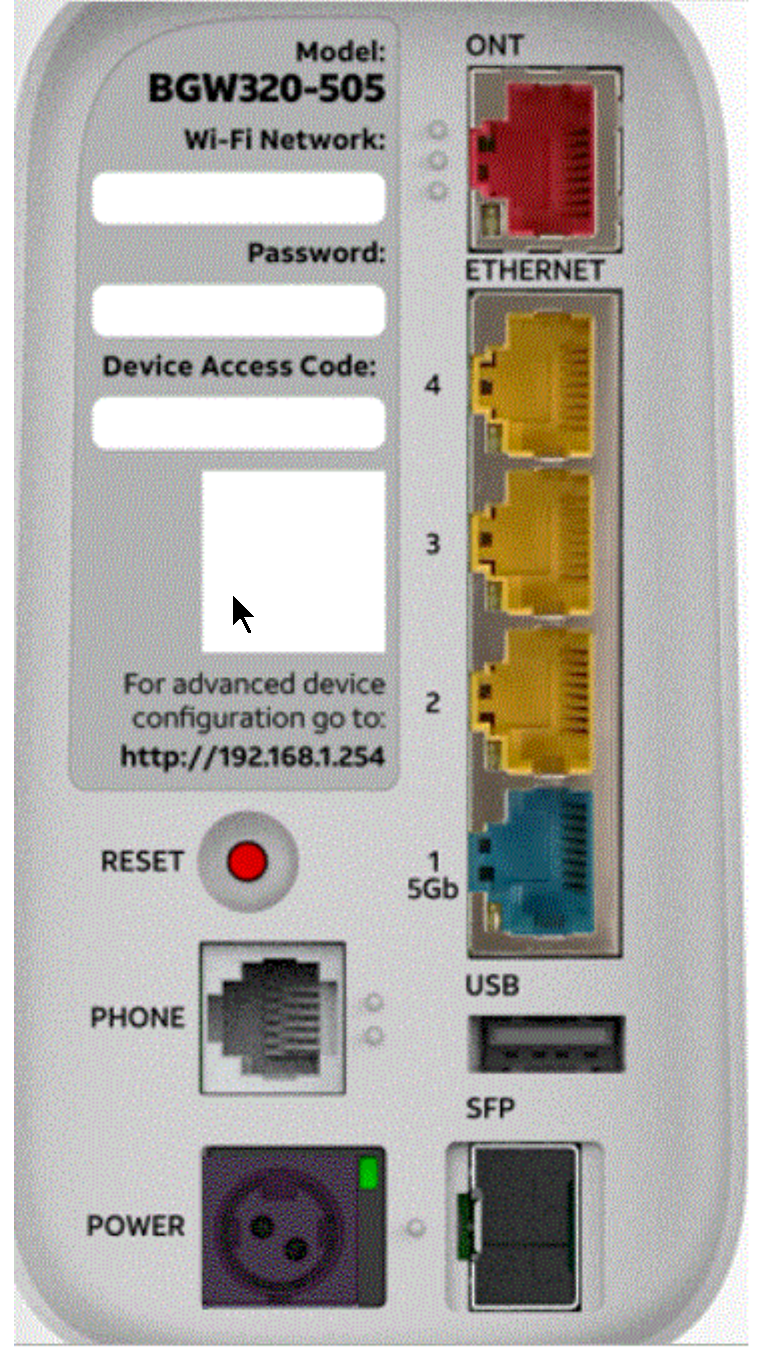

What is the Nokia BGW320-505?
The BGW320-505 is a fiber gateway / ONT (Optical Network Terminal) developed by Nokia (or built for/with them) and used by ISPs (especially in the U.S., e.g., AT&T) for fiber-to-the-home (FTTH) / multi-gigabit fiber broadband deployments. (WikiDevi.Wi-Cat.RU)
In simple terms: this device receives the optical (fiber) signal from the ISP, converts and distributes it via Ethernet + WiFi to your home network. It also integrates routing/WiFi functionality (so a separate router may or may not be needed depending on your setup).
Highlights:
-
Supports high-speed LAN/WiFi (including WiFi 6) which makes it suited for “multi-gig” plans (2 Gbps, 5 Gbps, etc).
-
Has multiple ports including a 5 GbE LAN port, SFP+ cage, etc (depending on the version) for advanced connectivity. (TechInfoDepot)
-
Marketed in the U.S. by AT&T under “BGW320” series for fiber customers. (AT&T)
So if you’re considering this device (in Nigeria or elsewhere) you’re looking at quite capable hardware — but also need to check compatibility with your ISP and local standards.
Key Specifications & Features
Here are some of the notable specs of the BGW320-505 (note: there may be minor variants).
| Feature | Details |
|---|---|
| LAN ports | 3 × 1 GbE LAN + 1 × 5 GbE LAN (in one documented spec) (WikiDevi.Wi-Cat.RU) |
| WAN / ONT fibre input | Fibre ONT functionality built-in (i.e., for FTTH) – device acts as gateway. |
| WiFi standard | Supports WiFi 6 / 802.11ax (including tri-band or multiple radios) in some versions. (TechInfoDepot) |
| Processor / memory | One listing: Broadcom BCM68580 @1.5 GHz (quad-core), 4 GB flash, 1 GB RAM. (WikiDevi.Wi-Cat.RU) |
| Power supply | 12 V DC, 4 A in one listing. (WikiDevi.Wi-Cat.RU) |
| User interface / features | The device has typical gateway features: NAT, firewall, WiFi configuration, LAN port settings, and in some cases SFP+ options. Interface: often at address 192.168.1.254 in U.S. deployments. (electrical-forensics.com) |
| Physical dimensions / installation | Documented in Nokia’s product guide. (FCC Report) |
One user comment:
“The only difference between them is one is manufactured by Nokia the other by Humax… other than that same tech …” (Reddit)
This refers to variants within the BGW320 series.
Why It’s a Good Device
Here are the major advantages of choosing this gateway/ONT:
-
High performance / future-proofing: With a 5 GbE port, WiFi 6 support, this device is built to handle more than “just” 1 Gbps broadband. If you anticipate faster fibre plans in the future (2 Gbps, 5 Gbps or more), this gives you headroom.
-
Integrated ONT + gateway: Means fewer devices (you don’t need a separate ONT and router in some setups) which can reduce complexity and potential points of failure.
-
Strong hardware: The specs show robust hardware, meaning better chance of stable performance under load (many devices, streaming, gaming, etc.).
-
Solid brand & support: Nokia is a recognized brand in broadband / access networks; using their equipment may imply reliability and access to documentation/support.
Things to Consider (Potential Limitations)
No product is perfect—here are caveats and things you should check:
-
ISP compatibility: Even though the device is capable, some ISPs lock down firmware, features, or require specific provisioning. If you’re outside the U.S., e.g., in Nigeria, you’ll need to check that your ISP supports this model (or is willing to activate it).
-
Fibre standard support: The device might only support certain PON types (e.g., GPON, XGS-PON) and your local fibre network may use a different standard. If they upgrade later to a newer PON (e.g., 10G-PON), you might need a newer ONT.
-
WiFi / LAN port limitation depends on variant: Even though this model has high-end specs, you need to confirm that the unit you buy has the full spec (especially the 5GbE port) and WiFi features. Some listings may be older or regional variants with lower spec.
-
Regional support, power & warranty: If you import the device (e.g., from U.S.), power supply, warranty/service may differ locally. Also, the firmware may be locked to U.S. regional configurations.
-
Cost vs need: If your broadband plan is only 100 Mbps or 300 Mbps (common in many markets), you may be over-investing in features you won’t fully utilise yet.
-
Tech support & configuration complexity: The advanced features (5 GbE, SFP+, WiFi6) may require more configuration to fully exploit. For simpler home use, those extra features may not matter.
Is It Suitable for You (in Nigeria / Port Harcourt)
Given your location (Port Harcourt, Nigeria) and the broadband market context, here are thoughts on suitability:
-
Check your fibre ISP and plan: If your ISP offers fibre with speeds of 1 Gbps or more (or aims to upgrade soon), this device makes sense. If your plan is lower, you might choose a simpler gateway.
-
Check fibre infrastructure standard: Ask your ISP what ONT/gateway they provide or support. If they use a particular ONT model currently, check if they allow the BGW320-505. Some ISPs may lock devices to prevent swapping by customers.
-
WiFi & home network needs: If you have many devices (smart TVs, gaming consoles, work-from-home setups, etc.), WiFi6 and the strong specification are beneficial. If you only have a few devices and mostly wired connections, less advanced device may suffice.
-
Budget vs premium features: The BGW320-505 is a “premium” device. If budget is constrained and your plan is modest, you might wait or choose a more cost-effective ONT/gateway.
-
Power & environment: Ensure your installation environment has stable power, good ventilation, and surge protection. High-end devices with faster components may generate more heat.
-
Support & warranty: If you import one, check local support options or whether you’re comfortable with limited warranty/import risk.
Setup & Tips for Best Performance
Here are recommendations when installing/using the BGW320-505 (or similar gateway/ONT):
-
Placement: Place the device in a well-ventilated area, not in a closed cupboard or under heavy heat. Good airflow extends lifespan and keeps WiFi performance stable.
-
Connect properly: Use good quality Ethernet cables (Cat 6 or better) especially if using >1 Gbps speeds.
-
WiFi optimisation:
-
Use the 5 GHz (and if available 6 GHz) bands for devices that need speed (gaming, streaming).
-
Use 2.4 GHz for older devices or ones further away.
-
Minimise interference: avoid placing the gateway near heavy metal objects, microwaves, thick walls, etc.
-
-
Firmware updates: Ensure the device has latest firmware (your ISP might manage this). Updates often improve performance, stability and security.
-
Router mode vs bridge mode: If you need advanced routing features, you might use the BGW320-505 in bridge mode and attach your own router behind it. But check if your ISP allows this.
-
Check speed bottlenecks: If you have a high-speed plan but not achieving expected speeds:
-
Test wired vs wireless (wired gives more accurate result).
-
Check LAN port speed (make sure the port negotiation is correct).
-
Ensure your endpoint device (PC, laptop) supports the speeds.
-
-
Secure your network:
-
Change default WiFi SSID and password.
-
Use WPA3 if available (or at least WPA2).
-
Disable WPS if not needed.
-
-
Backup configuration: If the device allows export of config, do so. If you make custom settings (static IPs, port forwards), know how to restore them.
Final Verdict
If I were to summarise:
The Nokia BGW320-505 is a high-quality, feature-rich fiber gateway/ONT that is very well suited for modern high-speed fibre broadband and advanced home networks. If your plan supports multi-gig speeds (2 Gbps, 5 Gbps) and you have many devices (WiFi, streaming, gaming), it’s an excellent choice.
However, if your broadband plan is modest (e.g., <500 Mbps) and you don’t need the advanced features yet, you might be able to save cost with a less premium device and upgrade later when the infrastructure grows.
Post a Comment